# How to use
You can add [Floor Generator](https://superhivemarket.com/products/floor-generator) to any Mesh Object and it will generate boards/tiles on all the surface of the Object. Simply select the Object and click on the + Add Floor Generator button.
This will add a **Geometry Node** to the selected Object which you can find in the Modifier tab. It is possible to control Floor Generator settings from both Sidebar (recommended) and in Modifier tab.
[Floor Generator](https://superhivemarket.com/products/floor-generator) will be created with the default settings. But there is a variety of settings which help you to customize the flooring to your special needs.
***
Add-on Panel Sections
{% tabs fullWidth="false" %}
{% tab title="Floor Pattern" %}
Easily switch between patterns from the drop-down menu at any time.\
[More about Floor Pattern section](https://nodecrafted.gitbook.io/floor-generator-3.0-manual/sections/floor-pattern).
{% endtab %}
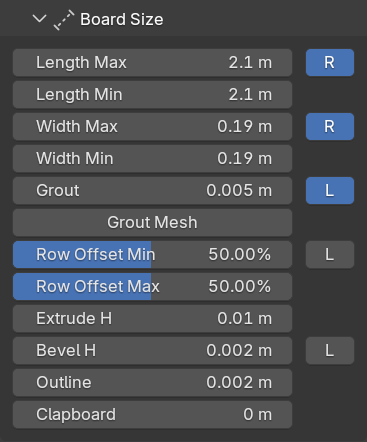
{% tab title="Board Size" %}
Board Size section contains all the parameters which allow to control **dimensions, variety and details** of each board of the flooring. The parameters are individual for every Floor Pattern.\
[More about Board Size section](https://nodecrafted.gitbook.io/floor-generator-3.0-manual/sections/board-size).
{% endtab %}
{% tab title="General" %}
General section contains parameters which are common for all the Floor Patterns.\
[More about General section](https://nodecrafted.gitbook.io/floor-generator-3.0-manual/sections/general).
{% endtab %}
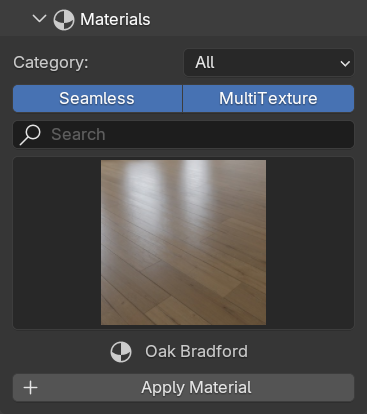
{% tab title="Materials" %}
The fastest way to add a material to your Floor Generator you can find in the Materials section. It contains a list of materials form the installed Material Library and empty templates to create custom materials.\
[More about Materials section](https://nodecrafted.gitbook.io/floor-generator-3.0-manual/sections/materials).
{% endtab %}
{% tab title="UV Settings" %}
This section is extremely useful for randomization which brings more realism into the scene.\
[More about UV Settings section](https://nodecrafted.gitbook.io/floor-generator-3.0-manual/sections/uv-settings).
{% endtab %}
{% tab title="Export" %}
Once you are happy with your flooring - you might want to use it in other applications (e.g. Unreal Engine, Unity etc.). For that purpose there is a single button which helps to prepare Floor Generator for export.\
[More about Export section](https://nodecrafted.gitbook.io/floor-generator-3.0-manual/sections/export).
{% endtab %}
{% endtabs %}
***
{% content-ref url="../sections/floor-pattern" %}
[floor-pattern](https://nodecrafted.gitbook.io/floor-generator-3.0-manual/sections/floor-pattern)
{% endcontent-ref %}
{% content-ref url="../sections/board-size" %}
[board-size](https://nodecrafted.gitbook.io/floor-generator-3.0-manual/sections/board-size)
{% endcontent-ref %}
{% content-ref url="../sections/general" %}
[general](https://nodecrafted.gitbook.io/floor-generator-3.0-manual/sections/general)
{% endcontent-ref %}
{% content-ref url="../sections/materials" %}
[materials](https://nodecrafted.gitbook.io/floor-generator-3.0-manual/sections/materials)
{% endcontent-ref %}
{% content-ref url="../sections/uv-settings" %}
[uv-settings](https://nodecrafted.gitbook.io/floor-generator-3.0-manual/sections/uv-settings)
{% endcontent-ref %}
{% content-ref url="../sections/export" %}
[export](https://nodecrafted.gitbook.io/floor-generator-3.0-manual/sections/export)
{% endcontent-ref %}